
 Sign in to Mod The Sims
 EA Model Plane for Surfaces
 EA Model Plane for Surfaces


ModelPlane.jpg - width=700 height=600
Various Colors.jpg - width=691 height=600
EA version.jpg - width=800 height=509
Another color choice can be seen in the thumbnail.
Mesh Details:
LOD 1:
Poly Count:
870
Vertex Count:
1,002
LOD 2:
Poly Count:
644
Vertex Count:
801
LOD 3:
Poly Count:
552
Vertex Count:
531
LOD 4:
Poly Count:
401
Vertex Count:
420
My sculpture:
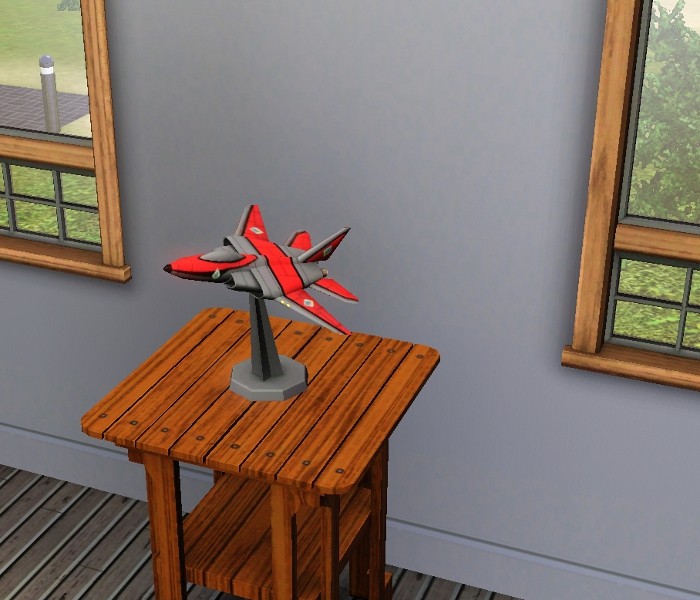
EA's version:
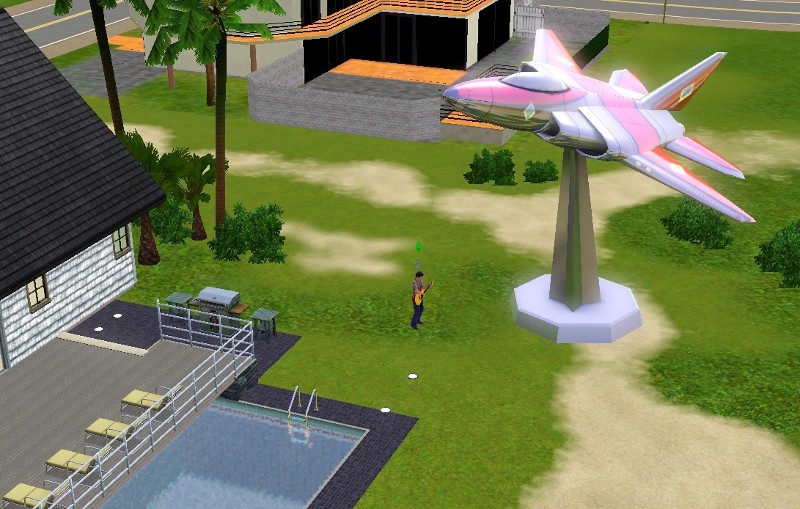
Polygon Counts:
870
This is a new mesh, and means that it's a brand new self contained object that usually does not require a specific Pack (although this is possible depending on the type). It may have Recolours hosted on MTS - check below for more information.
|
ModelPlane_jimTNW.zip
Download
Uploaded: 26th Jun 2010, 567.0 KB.
3,934 downloads.
|
||||||||
| For a detailed look at individual files, see the Information tab. | ||||||||
Install Instructions
1. Click the download button, or the filename, to download the file to your computer.
2. Extract the zip, rar, or 7z file. Now you will have either a .package or a .sims3pack file.
For Package files:
1. Cut and paste the file into your Documents\Electronic Arts\The Sims 3\Mods\Packages folder. If you do not already have this folder, you should read the full guide to Package files first: Sims 3:Installing Package Fileswiki, so you can make sure your game is fully patched and you have the correct Resource.cfg file.
2. Run the game, and find your content where the creator said it would be (build mode, buy mode, Create-a-Sim, etc.).
For Sims3Pack files:
1. Cut and paste it into your Documents\Electronic Arts\The Sims 3\Downloads folder. If you do not have this folder yet, it is recommended that you open the game and then close it again so that this folder will be automatically created. Then you can place the .sims3pack into your Downloads folder.
2. Load the game's Launcher, and click on the Downloads tab. Find the item in the list and tick the box beside it. Then press the Install button below the list.
3. Wait for the installer to load, and it will install the content to the game. You will get a message letting you know when it's done.
4. Run the game, and find your content where the creator said it would be (build mode, buy mode, Create-a-Sim, etc.).
Extracting from RAR, ZIP, or 7z: You will need a special program for this. For Windows, we recommend 7-Zip and for Mac OSX, we recommend Keka. Both are free and safe to use.
Need more help?
If you need more info, see:
- For package files: Sims 3:Installing Package Fileswiki
- For Sims3pack files: Game Help:Installing TS3 Packswiki
Loading comments, please wait...

Uploaded: 26th Jun 2010 at 2:40 PM
-
by HugeLunatic 15th Oct 2009 at 9:35pm
 30
72.6k
209
30
72.6k
209
-
by Robodl95 28th Jan 2010 at 6:17pm
11
25.7k
24
-
Scaled Down Lotus From World Adventures with More Options
by joninmobile 5th Mar 2010 at 6:02pm
+1 packs
13 18.4k 45 World Adventures
-
by rainbowtwilight updated 17th Apr 2010 at 5:11pm
21
51.8k
72
-

-
by armiel 23rd Oct 2010 at 10:40pm
14
32.3k
72
-
-
by armiel 29th Jan 2011 at 6:08pm
21
38.9k
91
-

by SierraW 22nd Apr 2011 at 6:13pm
33
39.7k
127
-


-

by joninmobile 9th Feb 2009 at 5:43pm
This career is designed with plantsims in mind. Seasons is not required, but is suggested. more...
 19
31.8k
28
19
31.8k
28
-


13 Santa Clause paintings for Christmas
by joninmobile updated 28th Nov 2007 at 10:00am
Here is a set of thirteen Santa Clause paintings for Christmas.They are recolors of the "Lady on Red" painting from more...
2
6.9k
3
-
Simple, Elegant, Modern Coffee Table
by joninmobile 5th Nov 2009 at 1:29am
I've made a nice, lovely, modern coffee table for you to enjoy! more...
+1 packs
11 15.9k 11 Pets
Pets
-
Regal One Tile Desks a Maxis Match
by joninmobile 1st May 2010 at 9:15pm
I've made two Maxis matches. They are fully functional one tile desks. more...
4
17.1k
14
By Function » Surfaces » Desks
-


A set of four 19th Century Paintings
by joninmobile 22nd Oct 2007 at 3:30am
Well after many days of reading extensive tutorials and hours spent trying to figure it out, I finally got my more...
2
9.8k
8
-
Hello Earth Original Art by me converted for sims 3
by joninmobile 9th Nov 2009 at 6:14pm
These paintings were recolors I shared here for the sims 2, and were my favorite orginal art created by me more...
10
15.9k
35
-
The Little Fairy For The Sims 3
by joninmobile 13th Mar 2010 at 4:59pm
I've converted one of my favorite outdoor meshes for the sims 3 for you to enjoy. more...
27
72.2k
219
-
Avast! Ye Swabs! Pirate Themed End Table + Model Clipper Ship
by joninmobile 6th Aug 2010 at 12:23pm
Arrrr! Matey! more...
14
42.1k
49
-
Original Art by me: "Night Jazz" recolor of Handle and spout
by joninmobile 16th Mar 2008 at 9:37pm
Here is an original painting by me called "Night Jazz" that I made using the gimp.This is a recolor of more...
3
5.7k
3
-
by joninmobile 17th Oct 2007 at 4:30pm
Here is a Chinese wood floor.I hope ya'll enjoy it.Hit thanks if you like it.Comments are always welcome. Additional Credits: gimp more...
4
7k
11


About Me
I hope you enjoy all the downloads I've brought to you over the years. It's been fun. Being a part of The Sims community has had it's ups and downs for me, but I keep on truckin' nonetheless. Lots and lots of drama, lots of pain and sorrow, but lots of laughs, and good times too. Made so many new friends over the years, and it all started by uploading to MTS way back in 2006. Have fun with my creations, that's what they're here for!
~ Jon