Sign in to Mod The Sims
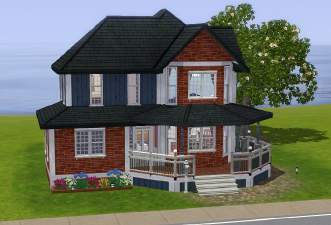
 Traditional Custom Colonial
 Traditional Custom Colonial


1.jpg - width=800 height=600
lowerfloorplan.jpg - width=800 height=600
upperfloorplan.jpg - width=800 height=600
3.jpg - width=800 height=600
4.jpg - width=800 height=600
5.jpg - width=800 height=600
6.jpg - width=800 height=600
9.jpg - width=800 height=600

This house includes:
(Lower floor)
Living room/Lobby
Full bathroom
Kitchen
Dining room
Recreation room

(Upper floor)
Master bedroom
Study
Full bathroom
Second bedroom (sutiable for one or two sims)
Upper lobby

On the lot:
Fully fenced yard
Small patio in the back
One driveway with one car space
Hilly landscape
Trees and flowers
This house features:
A beautiful wrap around porch
Octogon room with many windows
The color "creme"
I handplaced many pieces of furniture to get the feeling that a sim had moved the objects into place themselves, and to make the interior more authentic.
This house comes fully furnished.
Furnished: $155,185
Unfurnished: $76,619
The lot is 40x30.
Lot Size: 4x3
Lot Price: 76,619/155,185
Additional Credits:
Thanks to romagi for showing me feldynn's tutorial on adjusting roof pitches.
|
Custom Colonial - 2br, 2bath.rar
Download
Uploaded: 28th Jun 2009, 2.15 MB.
1,099 downloads.
|
||||||||
| For a detailed look at individual files, see the Information tab. | ||||||||
Install Instructions
1. Click the filename or the download button to download the file to your computer.
2. Extract the zip, rar, or 7z file.
2. Select the .sims3pack file you got from extracting.
3. Cut and paste it into your Documents\Electronic Arts\The Sims 3\Downloads folder. If you do not have this folder yet, it is recommended that you open the game and then close it again so that this folder will be automatically created. Then you can place the .sims3pack into your Downloads folder.
5. Load the game's Launcher, and click on the Downloads tab. Select the house icon, find the lot in the list, and tick the box next to it. Then press the Install button below the list.
6. Wait for the installer to load, and it will install the lot to the game. You will get a message letting you know when it's done.
7. Run the game, and find your lot in Edit Town, in the premade lots bin.
Extracting from RAR, ZIP, or 7z: You will need a special program for this. For Windows, we recommend 7-Zip and for Mac OSX, we recommend Keka. Both are free and safe to use.
Need more help?
If you need more info, see Game Help:Installing TS3 Packswiki for a full, detailed step-by-step guide!
Loading comments, please wait...



Uploaded: 28th Jun 2009 at 10:41 PM
-
by Mch36504 3rd Jul 2009 at 1:14am
 24
27.3k
39
24
27.3k
39
-
-
by gogolinopz 20th Jul 2009 at 11:16pm
2
5.3k
3
-
by anjubee 24th Jul 2009 at 10:22pm
11
7k
3
-

by rumicape 26th Jul 2009 at 9:23pm
5
12.5k
9
-
-
by Johnny_Bravo 16th Jul 2010 at 5:00pm
4
9.4k
9
-
-
-



-

Pool Pose Megapack! - Have a pool party! (UPDATED 7/1/2011)
by traelia updated 3rd Jul 2011 at 6:01am
Important: You will need cmomoney's Pose Player found here. more...
75
273.6k
242
-

Sassy Pose Pack - For cmomoney's Pose Player (UPDATED 6/14/11)
by traelia updated 14th Jun 2011 at 11:16pm
Important: You will need cmomoney's Pose Player found here. more...
39
133.7k
132
-

-
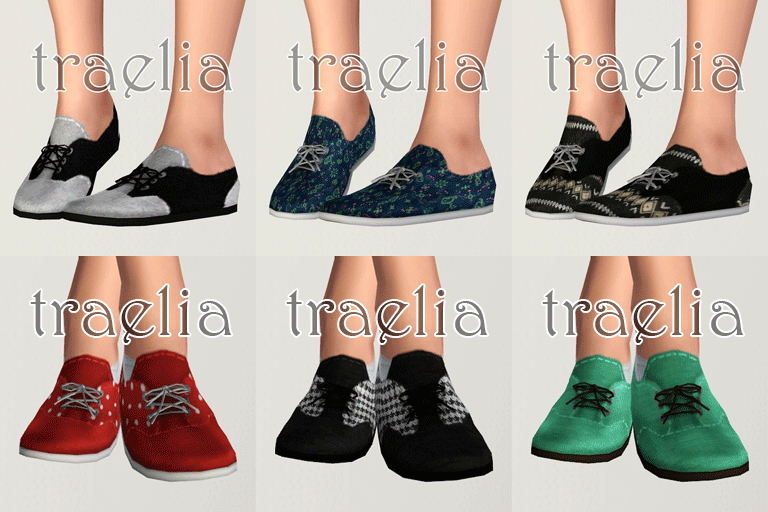
Goody Two Shoes - Canvas Sneakers for T-A females!
by traelia 8th May 2012 at 5:36pm
You like 3D stuffz? You like ceyoot 3d stuffz? Den yool love deeze sneakz! more...
-
Forgotten - A Man's lost dream
by traelia 12th Dec 2010 at 2:23pm
Once a beautiful a lucious cottage, this run-down house is worn like the spirit of the man who lives in it. more...
+3 packs
14 13k 15 World Adventures
 Ambitions
 Late Night
-

-

-


-

-


Fetching Dog Eye Default Replacements + Dog Eye Fix
by traelia 17th Aug 2012 at 6:25pm
I couldn't forget the pups! more...
+1 packs
39 91.7k 294 Pets
Pets
Create-A-Pet » Genetics » Dogs