
 Sign in to Mod The Sims
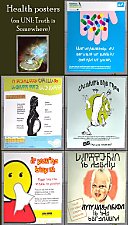
 Wall Hangings Sanity Project 1 - Four posters
 Wall Hangings Sanity Project 1 - Four posters

InvertedVertigo.jpg - width=731 height=542
I also try to save most textures by making texture referencing or standard recolours for the items that are kept.
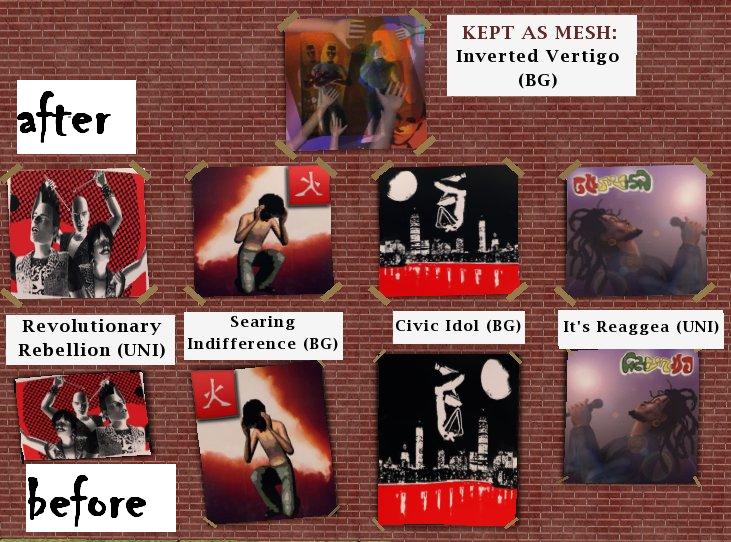
This instalment has hiders for two basegame and two UNI posters. Textures are transferred to the Inverted Vertigo basegame poster. So each zip includes a hider, plus the corresponding recolour for the Inverted Vertigo. Three of the recolours are texture referencing recolours (i.e. they contain no texture of their own, just a "link" to the original (and now hidden) textures. They are much smaller this way). The one for It's Reaggea is a standard recolour - I liked it to much to let it go waste.
Of course the new recolours look different from the original posters, but I think they suit the Inverted Vertigo poster, which is supposed to be some music cover art.
I am also including a fix made by HugeLunatic for the mesh of the Inverted Vertigo poster which will flip all textures horizontally (i.e. the guys that were facing in one direction will face in the opposite direction. This is to make the direction they are facing similar to the original posters - it is optional and not necessary for the hiders or recolours to work.)
Please note that if you had recolours for the posters which are now hidden, they will have nowhere to show up any more, so only use the hiders if you do not mind this.
EP compatibility: the name of each zip and each file tells you which EPs are required - in this case, BG or UNI.
Installation:
The hiders and the optional mesh fix go in your Downloads folder. Delete to remove.
Put the TR recolours in
Program files/HighestEP/TSData/Res/Catalog/Bins or
Program files/HighestEP/TSData/Res/Catalog/Skins (with the added benefit that they will have no CC star). The standard recolour could go in Downloads, but for the sake of simplicity, I just put them together with the TR recolours.
If you had any of the now-hidden posters in a lot before, they will not disappear.
Enjoy your cleaner catalogue!
Additional Credits:
SimPE, Gimp
Thanks to HugeLunatic for making the mesh fix.
|
inverted-vertigo-mesh-fix-by-HugeLunatic.zip
Download
Uploaded: 12th Oct 2009, 3.4 KB.
417 downloads.
|
||||||||
|
WHS1 - UNI-RevolRebellion.zip
| One hider and one texture referencing recolour
Download
Uploaded: 12th Oct 2009, 1.6 KB.
433 downloads.
|
||||||||
|
WHS1 - UNI-It'sReaggea.zip
| One hider and one standard recolour
Download
Uploaded: 12th Oct 2009, 39.6 KB.
431 downloads.
|
||||||||
|
WHS1 - Basegame-Searing Indifference.zip
| One hider and one texture referencing recolour
Download
Uploaded: 12th Oct 2009, 1.6 KB.
434 downloads.
|
||||||||
|
WHS1 - Basegame_Civic Idol.zip
| One hider and one texture referencing recolour
Download
Uploaded: 12th Oct 2009, 1.5 KB.
465 downloads.
|
||||||||
| For a detailed look at individual files, see the Information tab. | ||||||||
Install Instructions
1. Download: Click the download link to save the .rar or .zip file(s) to your computer.
2. Extract the zip, rar, or 7z file.
3. Place in Downloads Folder: Cut and paste the .package file(s) into your Downloads folder:
- Origin (Ultimate Collection): Users\(Current User Account)\Documents\EA Games\The Sims™ 2 Ultimate Collection\Downloads\
- Non-Origin, Windows Vista/7/8/10: Users\(Current User Account)\Documents\EA Games\The Sims 2\Downloads\
- Non-Origin, Windows XP: Documents and Settings\(Current User Account)\My Documents\EA Games\The Sims 2\Downloads\
- Mac: Users\(Current User Account)\Documents\EA Games\The Sims 2\Downloads
- Mac x64: /Library/Containers/com.aspyr.sims2.appstore/Data/Library/Application Support/Aspyr/The Sims 2/Downloads
- For a full, complete guide to downloading complete with pictures and more information, see: Game Help: Downloading for Fracking Idiots.
- Custom content not showing up in the game? See: Game Help: Getting Custom Content to Show Up.
- If you don't have a Downloads folder, just make one. See instructions at: Game Help: No Downloads Folder.
Loading comments, please wait...
-
Individual Soccer Uniform Hiders -Pick and Choose!-
by Phaenoh 30th May 2008 at 1:34am
 +1 packs
26 21.6k 31
+1 packs
26 21.6k 31 Free Time
-
-

-

by HugeLunatic 15th Apr 2014 at 8:02pm
8
26k
40
-
by CarverUllrich 4th Oct 2014 at 1:28pm
+1 packs
11 31.9k 43 Apartment Life
-
-
No more helmets! Hide the fugly project
by Josefa_B 6th Nov 2017 at 2:08pm
+1 packs
4 8.7k 21 Free Time
-
by pinkdynamite 23rd Feb 2019 at 10:04pm
+1 packs
8 9.7k 14 Free Time
-

Maxis Athletic & Outerwear Recategorized
by IntincrMars updated 15th May 2026 at 6:13am
+2 packs
5 6.2k 10 Nightlife
 Seasons




-
Lunatech spare fixture table lamp hiders
by Gwenke33 22nd Nov 2009 at 10:09pm
I received a request to consolidate these base game lamps into one catalogue entry. more...
3
12.1k
4
-

-
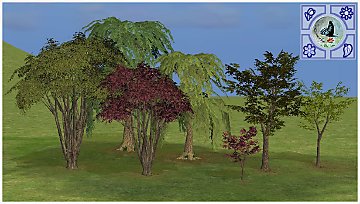
Seasonal Maxis tree recolours and resized trees
by Gwenke33 19th Oct 2011 at 4:33pm
Seasonal Maxis tree recolours and resized trees - willow, midbiscus, Japanese maple, bay tree more...
15
39k
67
-
-

-
Recolours of FeeEssen's bicycle stands
by Gwenke33 1st Dec 2009 at 7:06am
Quite a few of my sims have bikes instead of cars, so I created some recolours for FeeEssen's new(ish) mesh. more...
8
46k
46
-
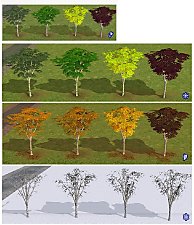
Seasons-friendly birch tree recolours
by Gwenke33 25th May 2011 at 10:40pm
Four seasons-friendly birch tree recolours more...
+1 packs
13 27.3k 36 Seasons
-
-
Seasons-friendly tall poplar 'hood deco trees
by Gwenke33 29th Jul 2011 at 6:06am
Two 'hood deco trees which change with the seasons. more...
+1 packs
16 41.4k 54 Nightlife
Miscellaneous » Neighborhoods & CAS Screens » Neighbourhood Deco
-

Packs Needed
| Expansion Pack | |
|---|---|
 | University |