
 Sign in to Mod The Sims
 Request: "Fence Post Extenders" That Actually Fit
 Request: "Fence Post Extenders" That Actually Fit


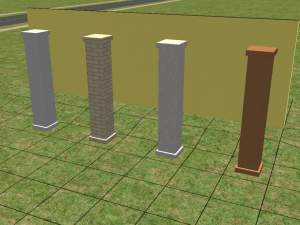
OffsetColumns_small.JPG - width=640 height=452
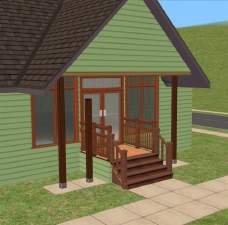
Fence post extenders, in use
ColumnPlacement2_small.JPG - width=341 height=480
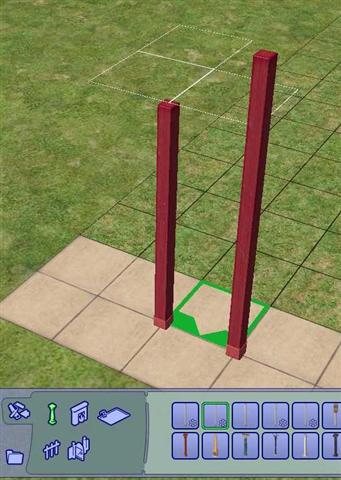
Fence post extenders, showing offset and relative size
At Phaenoh's request, I have adapted my Simple Columns That Actually Fit to have a built-in offset for use with porch railings or fences. As illustrated in Phae's award winning Katrina series, simple columns can look quite effective when blended in with porch fences, but this normally requires the use of boolProp snapObjectsToGrid false and some precise fiddling to place the column in just the right place.
The two simple columns in this upload already have the correct half-tile offset built-in, to make placement of these "fence post extenders" an easy task. It is not even necessary to use move_objects on to overlay a fence post with these or the game's built-in columns. But unlike the Maxis posts, these columns are tall enough to actually join up with an overhanging roof without leaving an unrealistic and unsightly gap.
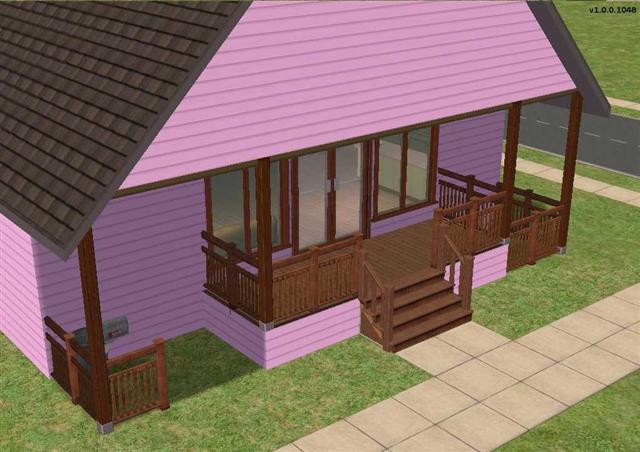
As seen in the picture above, the columns blend in very nicely with the porch fences, and it is not immediately obvious that they are different objects sharing the same tile.
The Medium #2 Offset Column is equivalent to my 5% Taller Column in Simple Columns That Actually Fit, and the Medium #4 Offset Column equates to the 31% Taller Column. The Medium #2 column is appropriate for supporting a roof from a porch or foundation, and the Medium #4 column is tall enough to reach from the ground at the base of a foundation up to the roof line. In honour of Phae's Katrina project, the columns are slightly discounted below the game's original price: the #2 column costs §68, and the #4 column costs §69.
Tech Notes
As seen above, these offset columns are placed at exactly the intersection between four tiles. The column can be adjusted to any of the four possible tile intersections by rotating it with the mouse or the comma and period (dot) on the keyboard. Because of the offset and through the use of rotation, it is possible to exactly overlay one column with its neighbour on the next tile without using move_objects on, which would be a waste of money. Note that in the picture, I am using the mouse to place the taller column on the right, i.e. the column is positioned to the right of and at the front of the green placement arrow.
These offset columns use the repository technique to reference the recolours of the base game's original. Please recolour the original if you wish these posts to be available in other colours. I am indebted to the Slave Object Tutorial by IgnorantBliss for making a complex procedure easy. And with credit to advice from Jasana BugBreeder and Rebecah, these columns are visible from the neighbourhood view, even in the base game.
Terms of Use
You may include either of these objects in uploaded lots, whether free or for pay. Please provide a credit and link back to this page. It would be nice if you sent me a PM with a link to your creation, but this is not necessary. Please do not upload these columns otherwise than in lots. Pictures that include the columns may be published without any credit or link.
Additional Credits
SimPE and CEP, which together make it all possible
Milkshape 3D, for adjusting the height and position of the columns
Microsoft Paint and Microsoft Photo Editor, for preparing the uploaded screen captures
Polygon Counts
Lot View: 94 faces, 158 vertices for each object, the same as the Maxis original.
Neighbourhood View: 20 faces, 32 vertices for each object, the same as the Maxis original.
This is a new mesh, and means that it's a brand new self contained object that usually does not require a specific Pack (although this is possible depending on the type). It may have Recolours hosted on MTS - check below for more information.
|
SDcolumnvalue_offset.zip
| Height adjusted "fence post extenders"
Download
Uploaded: 14th Feb 2008, 17.0 KB.
4,834 downloads.
|
||||||||
| For a detailed look at individual files, see the Information tab. | ||||||||
Install Instructions
1. Download: Click the download link to save the .rar or .zip file(s) to your computer.
2. Extract the zip, rar, or 7z file.
3. Place in Downloads Folder: Cut and paste the .package file(s) into your Downloads folder:
- Origin (Ultimate Collection): Users\(Current User Account)\Documents\EA Games\The Sims™ 2 Ultimate Collection\Downloads\
- Non-Origin, Windows Vista/7/8/10: Users\(Current User Account)\Documents\EA Games\The Sims 2\Downloads\
- Non-Origin, Windows XP: Documents and Settings\(Current User Account)\My Documents\EA Games\The Sims 2\Downloads\
- Mac: Users\(Current User Account)\Documents\EA Games\The Sims 2\Downloads
- Mac x64: /Library/Containers/com.aspyr.sims2.appstore/Data/Library/Application Support/Aspyr/The Sims 2/Downloads
- For a full, complete guide to downloading complete with pictures and more information, see: Game Help: Downloading for Fracking Idiots.
- Custom content not showing up in the game? See: Game Help: Getting Custom Content to Show Up.
- If you don't have a Downloads folder, just make one. See instructions at: Game Help: No Downloads Folder.
Loading comments, please wait...



Uploaded: 14th Feb 2008 at 3:38 PM
Updated: 29th Feb 2012 at 8:39 PM - Improve the formatting of the text
-
-
by Brasstex 6th Jul 2005 at 7:48pm
 40
52.8k
41
40
52.8k
41
-
by darylmarkloc 26th Jan 2006 at 5:35pm
+1 packs
19 23k 14 Nightlife
-
by nanisim 27th Jan 2007 at 1:03am
13
18k
18
-
by KatrinaB 16th May 2007 at 7:23am
4
16.3k
6
-

-
-
-
by SimArchitect 18th Oct 2008 at 3:23pm
9
36.9k
22
-
by AdonisPluto 30th Jul 2013 at 12:36am
4
8.9k
18


-
Economy Maintenance Free Dishwasher with Stealth NPC Worker & Recolours
by Sophie-David 1st Dec 2010 at 6:47am
Maintenance Free Economy Dishwasher with NPC Worker, Featuring Seen & Not Heard Technology, with Recolours more...
27
41.1k
32
-
Six Nightlife Images of the Pacific Rim Rainforest, #1
by Sophie-David 28th Aug 2007 at 1:24am
Title Six Nightlife Images of the Pacific Rim Rainforest, #1 Description This is a collection of more...
+1 packs
3 7.4k 5 Nightlife
-


Seasons Wishing Wells of Hazard
by Sophie-David updated 15th Apr 2015 at 5:14am
Drinking from this Seasons Wishing Well will randomly produce good, bad, or neutral outcomes more...
+1 packs
20 41.4k 66 Seasons
-
Six Rossetti "Medieval" Paintings, Glamour Life
by Sophie-David 16th Aug 2007 at 4:44am
Title Six Rossetti "Medieval" Paintings, Glamour Life Description As a Pre-Raphaelite, Dante Gabriel Rossetti was an more...
+1 packs
5 16.9k 9 Glamour Life
-
Toybox Recolours Matched to the Craftmeister Cheap Bed
by Sophie-David 3rd Oct 2011 at 4:23pm
22 basegame toybox recolours with 9 matched to the cheap single bed more...
9
27.3k
28
-
by Sophie-David updated 21st Sep 2007 at 6:34am
Title - Request: Teen Witch Posters Description These two Teen Witch posters are in response to a more...
6
7.4k
4
-
The Sims 2 Opportunity Pack Extension Speaker
by Sophie-David updated 17th Dec 2016 at 6:21am
To provide an Extension Speaker that allows an audience to hear a speech made from a stage or pulpit. more...
15
39.4k
37
-
Seven Maxis Match "Value" Mirrors for Fat City Counters
by Sophie-David 5th Sep 2007 at 1:27am
Title Seven Maxis Match "Value" Mirrors for Fat City Counters Description These downloads contain recolours of more...
10
23.7k
53
-
Tom Duhamel's Enhanced Gameplay Cameras: High Altitude Option
by Sophie-David 19th Mar 2013 at 9:56pm
Tom Duhamel's build, first person & live cameras, modified to permit high altitude use more...
14
47.6k
57
-

Two Bonus Dante Gabriel Rossetti Prints, Lady on Red Recolours
by Sophie-David updated 10th Aug 2015 at 6:37am
Title Two Bonus Dante Gabriel Rossetti Prints, Lady on Red Recolours August 9th, 2015 Framing Correction Probably more...
8
9.1k
6


