
 Sign in to Mod The Sims
 Tool to work with UI textures - new version 8/17/16
 Tool to work with UI textures - new version 8/17/16


S4_00B2D882_00064DC9_D09F3192B876C1EB%%+_IMG.jpg - width=512 height=512
UI Willow Creek map texture - color part
S4_00B2D882_00064DCA_D09F3192B876C1EB%%+_IMG.jpg - width=1024 height=1024
UI Willow Creek map texture - luminance and alpha
WillowCreekUnchanged.jpg - width=1024 height=1025
UI Willow Creek map texture combined
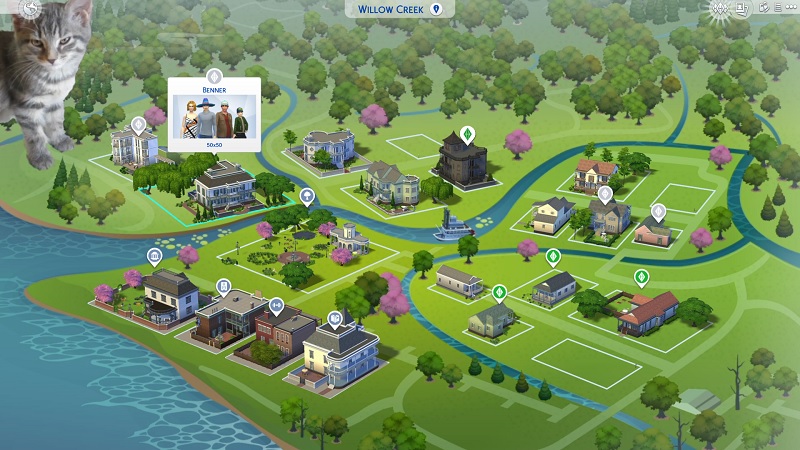
MonsterKitteninWillowCreek.jpg - width=800 height=450
Modified Willow Creek map in-game
TextureSquasher.jpg - width=898 height=444
Tool screen short
The UI image pairs have the same Instance ID, one has Group 0x00064DC9 and the other has Group 0x00064DCA. Be sure to load each in the right place in the tool or you'll get very strange-looking results.
Images must have dimensions that are a multiple of 4 to compress correctly: 32, 64, 128, 256, 512, 1024, 2048, etc. If you keep images the same dimensions as the game textures that should work fine.
The program is available as a single file (UITextureSquasher_1_1_0_0.zip). If for whatever reason that doesn't work on your system, please try the version with separate files in a folder (UITextureSquasher_1_1_0_0_folder.zip) and comment here.
Requires .NET 4.0 or above.
The latest version of s4pe will preview and extract the UI.package images: https://github.com/s4ptacle/Sims4Tools/releases
The pictures attached are the two Willow Creek map images from UI.package, the combined bitmap image, and a modified Willow Creek in-game.
Update 8/14/16: Changed conversion format from BMP to PNG, since bmp images seem to open in Photoshop and Paint.net with a black background in transparent areas. Added error check for opening the wrong type of DDS file.
Update 8/17/16: Fixed a compression bug that was causing degradation of the DDS files converted from PNG.
Additional Credits:
The EA forums and SimGuruModSquad: http://forums.thesims.com/en_US/dis...s-in-ui-package
Everyone who's contributed to s4pi/s4pe
Inge for testing
|
UITextureSquasher_Source_1_2_0_0.zip
| Source code files, not needed to use the program
Download
Uploaded: 18th Aug 2016, 28.4 KB.
1,628 downloads.
|
||||||||
|
UITextureSquasher_1_2_0_0_folder.zip
| UITextureSquasher program with separate files in a folder - unzip and run UITextureSquasher.exe
Download
Uploaded: 18th Aug 2016, 96.8 KB.
1,703 downloads.
|
||||||||
|
UITextureSquasher_1_2_0_0.zip
| UITextureSquasher program in a single file - unzip and run UITextureSquasher_1_1_0_0.exe
Download
Uploaded: 18th Aug 2016, 77.2 KB.
4,141 downloads.
|
||||||||
| For a detailed look at individual files, see the Information tab. | ||||||||
Install Instructions
1. Download: Click the File tab to see the download link. Click the link to save the .rar or .zip file(s) to your computer.
2. Extract: Use 7zip (Windows) to extract the file(s) from the .rar or .zip file(s).
3. Cut and paste the file(s) into your Mods folder
Need more information?
- My Documents\Electronic Arts\The Sims 4\Mods\
- Anyone can use both .rar and .zip files easily! On Windows, use 7zip!
- If you don't have a Mods folder, just make one.
Loading comments, please wait...



Uploaded: 10th Aug 2016 at 4:15 PM
Updated: 18th Aug 2016 at 12:09 AM - New version upload
-
TS4 MOD Simple Manage(Game Launcher)04/14/2015Updated to v2.2
by Sakura4 updated 13th Apr 2015 at 6:02pm
 128
172k
372
128
172k
372
-

-
-

HQ Texture Converter - version 2.7.0.0 - updated 2/14/2023
by CmarNYC updated 14th Feb 2023 at 5:12pm
249
252.5k
266
-
by CmarNYC updated 12th Oct 2020 at 7:56pm
266
123.7k
202
-
TS4 Skin Converter V2.3, enable CC skintones in CAS
by CmarNYC updated 11th Dec 2020 at 12:25am
152
95.3k
158
-
-
by denton47 updated 15th Feb 2026 at 7:33am
217
82.6k
206
-
XonoNight's Custom Loading Screen Tips
by XonoNight 2nd Jul 2025 at 11:25am

-

-

Nifty Knitting Clothing Unlocked
by CmarNYC 6th Aug 2020 at 8:46pm
Removes the requirement to knit the knittable clothing in the Nifty Knitting pack. more...
9
11.4k
46
-

Tattooinator, a tool for creation of custom tattoos - update 8/28/13
by CmarNYC updated 28th Aug 2013 at 2:46pm
A tool to preview and package custom tattoos for Ambitions. more...
 193
241.1k
405
193
241.1k
405
-

Fixes for missing pregnant morphs - nude and jeans - update 8/9/10
by CmarNYC updated 7th May 2011 at 2:17pm
These mods supply the missing pregnant morphs for the nude adult female and the 'relaxed jeans'. more...
186
436.5k
588
Female » Mixed Sets » Adult
-
TS4 Skin Converter V2.3, enable CC skintones in CAS
by CmarNYC updated 11th Dec 2020 at 12:25am
This tool will convert CC skintones to the latest version so they will appear in CAS more...
152
95.4k
158
-
-

HQ Texture Converter - version 2.7.0.0 - updated 2/14/2023
by CmarNYC updated 14th Feb 2023 at 5:12pm
Resizes textures for compatibility with the TS4 HQ Mod. more...
249
253.1k
266
-

TS4 Skininator - Version 2.6.1, 3/23/2023
by CmarNYC updated 23rd Mar 2023 at 7:54pm
A tool for the creation of custom skintones for The Sims 4 more...
345
207.9k
429
-

by CmarNYC 5th Dec 2012 at 11:21pm
Brand-new maternity clothes for pregnant teens, all categories, Seasons-compatible more...
124
422.3k
817
Female » Mixed Sets » Teen
-


S4 CAS Tools - updated to V3.8.2.0 on 3/18/2023
by CmarNYC updated 18th Mar 2023 at 8:21pm
A program for the cloning of game CAS parts, working with CAS custom content packages, and converting meshes more...
558
333.1k
510


About Me
My policy on use of my work:
Feel free to use any of my meshes, morphs, skins, or whatever as a base. If you change, convert, or enhance my stuff you may post it without asking, but please give credit. If you use them without changes, please post a link to my downloads rather than reposting. However, you may include them with Sims or lots without asking, but with credit.
Please do not post anything using my creative work on any pay site or the Exchange, unless it's in a free section of a pay site. If you want to post your own original creation made using my tools to a pay site or the Exchange, you may do so, but give credit for the tool.
Obviously my tools are for free use by anyone, but I'd appreciate a credit if you post something created with them.
So basically: no pay site, no Exchange, give credit. Other than that, meh.
If at some time I lose interest in Sims 3, or am too busy, or die, anyone who wants to may update/modify/add to any of my work as long as they follow the MTS policy on updating broken or outdated custom content.
I don't take requests. Suggestions for enhancing work I'm doing or have done are welcome, whether or not I act on them, but please no requests for totally unrelated stuff that I probably have no idea how to do.