
 Sign in to Mod The Sims
 Werewolf Dimorphism Mod
 Werewolf Dimorphism Mod



Thumb.jpg - width=408 height=494
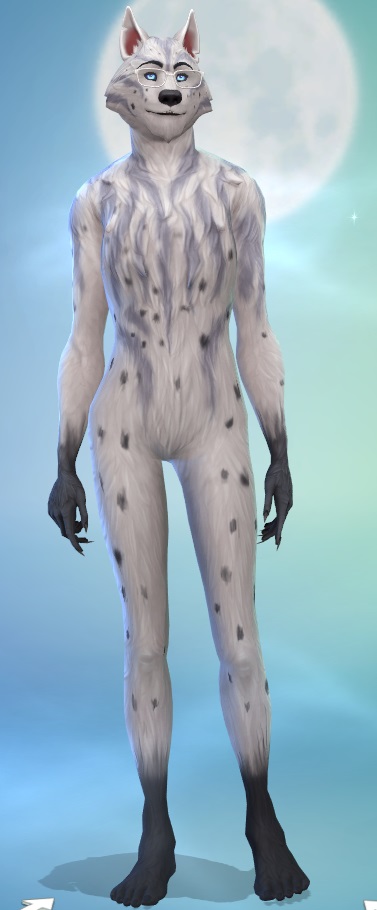
Wolfette Fury CAS.jpg - width=377 height=910
Wolfette Fury CAS 5.jpg - width=280 height=944
Wolfette Fury CAS 3.jpg - width=334 height=941
Wolfette Fury CAS 4.jpg - width=323 height=876
Wolfette Fury.jpg - width=438 height=826
- The bust is fairly subtle in the nude werewolf, and tends to disappear in female clothing. I haven't been able to find a way around this. In my days of experimenting, making the breasts bigger doesn't make much difference and makes the flatness and distortion in clothing more noticeable. Ironically, they look better in male clothing.
- There's some distortion in clothing, especially female clothing, but IMO no worse than the EA version.
Will conflict with any other mods replacing the female werewolf morph resources:
0xDB43E069-0x00000000-0xBEF5A7CF3ED74EAE
0xDB43E069-0x00000000-0x19909D3B46370BF5
Made using TS4 MorphMaker.
| Filename | Type | Size |
|---|---|---|
| cmar_WerewolfDimorphism.zip | zip | |
| cmar_WerewolfDimorphism.package | package | 381919 |
|
cmar_WerewolfDimorphism.zip
| Modifies werewolf morph for females
Download
Uploaded: 17th Jul 2022, 369.7 KB.
24,119 downloads.
|
||||||||
| For a detailed look at individual files, see the Information tab. | ||||||||
Install Instructions
1. Download: Click the File tab to see the download link. Click the link to save the .rar or .zip file(s) to your computer.
Read the upload description for installation instructions. If nothing else is specified, do the following:
2. Extract: Use WinRAR (Windows) to extract the .package file(s) (if included, ts4script as well) from the .rar or .zip file(s).
3. Cut and paste the .package file(s) (if included, ts4script as well) into your Mods folder
- Windows XP: Documents and Settings\(Current User Account)\My Documents\Electronic Arts\The Sims 4\Mods\
- Windows Vista/7/8/8.1: Users\(Current User Account)\Documents\Electronic Arts\The Sims 4\Mods\
Need more information?
- Anyone can use both .rar and .zip files easily! On Windows, use WinRAR.
- If you don't have a Mods folder, just make one.
- Mod still not working? Make sure you have script mods enabled

Loading comments, please wait...



-

by Tarruvi updated 10th Sep 2024 at 10:48am
-
by baniduhaine updated 10th Jun 2023 at 8:53pm
-
by plumbobkingdom 21st Jun 2022 at 9:45pm
 +19 packs
4 14.6k 25
+19 packs
4 14.6k 25 Get to Work
 Outdoor Retreat
 Get Together
 City Living
 Perfect Patio Stuff
 Cats and Dogs
 Get Famous
 Spooky Stuff
 Island Living
 Discover University
 Eco Lifestyle
 Cottage Living
 Vampires
 Horse Ranch
 Laundry Day Stuff
 Jungle Adventure
 Strangerville
 Star Wars: Journey to Batuu
 Werewolves
-
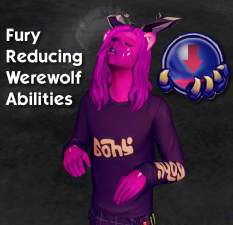
Fury Reducing Werewolf Abilities v1.1
by InternWaffle updated 7th Jul 2022 at 3:47pm
+1 packs
3 13.4k 26 Werewolves
-
-
by DerekSimsYT 19th Apr 2023 at 10:58pm
+2 packs
4 10.5k 25 Seasons
Werewolves
Seasons
Werewolves
-
Extra Cross-Stitch Patterns Mod
by JaneSimsten 27th Sep 2023 at 1:59pm
+1 packs
2 11.1k 29 Cottage Living
-
-
Allow Vampires with Super Strength to enter Werewolf Doors
by MoonPlum 12th Jan 2025 at 7:30pm
+1 packs
1 4.3k 2 Werewolves
-
Slower and No Decay for Werewolf Clubs
by PiperK1980 updated 27th Mar 2025 at 11:08am
+1 packs
4 2.6k 8 Werewolves


-
Pregnancy morphs added to six game clothes - updated 8/9/10
by CmarNYC updated 9th Aug 2010 at 12:42pm
Added pregnancy morphs for game clothing. more...
 47
175.9k
292
47
175.9k
292
Female » Mixed Sets » Adult
-
Fixers for sliders, hair, skins after werewolf patch - V2.2 Alpha 7/3/22, V1.1 Sliders, 6/25/22
by CmarNYC updated 3rd Jul 2022 at 6:15pm
These are two tools to fix sliders and alpha hairs/skins/etc. broken by the June 2022 werewolf patch. more...
305
223k
141
-
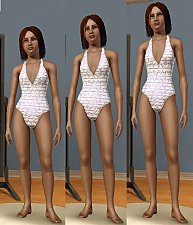
Enhanced Leg Sliders - V2 6/15/2022
by CmarNYC updated 15th Jun 2022 at 3:31pm
Added morphs for thighs and lower legs more...
-
-

-
-
TS4 Skin Converter, version 1.2, 7/8/2019 - NOW OBSOLETE
by CmarNYC updated 8th Jul 2019 at 9:38pm
A tool to convert CC skintones to support tanning and sunburns. more...
116
46.4k
101
-
Sim Outfit Changing Script - new version 10/31/2013
by CmarNYC updated 31st Oct 2013 at 4:09pm
Script to expand the choices of Sim Outfits, including Career, NPC, and Custom. more...
115
160.8k
267
-

Meshing Toolkit - version 1.4.9 uploaded 12/20/2018
by CmarNYC updated 20th Dec 2018 at 3:04pm
A set of tools for automating some of the more tedious and difficult meshing tasks. more...
297
309.8k
296
-
TS4 Package Searcher - update 4/22/2020
by CmarNYC updated 22nd Apr 2020 at 6:39pm
A small tool that searches all the Sims 4 game packages by any combination of type, group, and/or instance ID. more...
13
60.6k
88


Packs Needed
| Game Pack | |
|---|---|
 | Werewolves |
About Me
My policy on use of my work:
Feel free to use any of my meshes, morphs, skins, or whatever as a base. If you change, convert, or enhance my stuff you may post it without asking, but please give credit. If you use them without changes, please post a link to my downloads rather than reposting. However, you may include them with Sims or lots without asking, but with credit.
Please do not post anything using my creative work on any pay site or the Exchange, unless it's in a free section of a pay site. If you want to post your own original creation made using my tools to a pay site or the Exchange, you may do so, but give credit for the tool.
Obviously my tools are for free use by anyone, but I'd appreciate a credit if you post something created with them.
So basically: no pay site, no Exchange, give credit. Other than that, meh.
If at some time I lose interest in Sims 3, or am too busy, or die, anyone who wants to may update/modify/add to any of my work as long as they follow the MTS policy on updating broken or outdated custom content.
I don't take requests. Suggestions for enhancing work I'm doing or have done are welcome, whether or not I act on them, but please no requests for totally unrelated stuff that I probably have no idea how to do.