
 Sign in to Mod The Sims
 Creeping Ivy
 Creeping Ivy


sizes.jpg - width=800 height=359
garden.jpg - width=800 height=525
corner.jpg - width=800 height=514
fence.jpg - width=1000 height=640
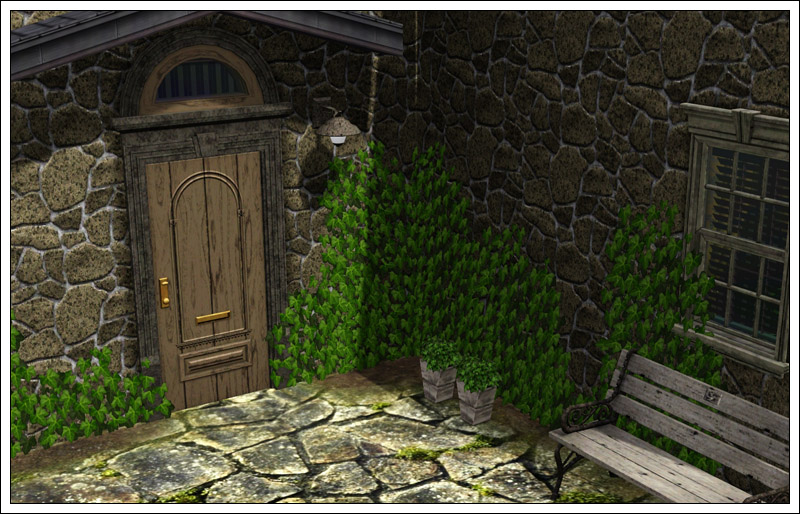
In the area where I live, it's literally everywhere and I love it, it's green all year round, so I decided to make some for the Sims.
There are 4 sizes, in 4 separate files, each with a custom thumbnail. They are in Decorative/Plants and cost 10§. You can vary the sizes for a random pattern, and place them over each other for a more dense look. They will line up nice along walls and most fences, for thick fences you may need to place them holding the Alt key. They have no shadow, sorry.
There is one issue that I can't fix, it is very difficult to grab them once placed. Turn the camera so that it's facing the front of the object at ground level, and move the cursor around the bottom leaves until you find the spot to grab.
Polygon Counts:
Ivy 01: 250 faces, 500 vertices
Ivy 02: 438 faces, 876 vetices
Ivy 03: 654 faces, 1308 vertices
Ivy 04: 862 faces, 1724 vertices
Additional Credits:
S3OC, S3PE, ObjTool and plugins.
This is a new mesh, and means that it's a brand new self contained object that usually does not require a specific Pack (although this is possible depending on the type). It may have Recolours hosted on MTS - check below for more information.
|
CreepingIvy.rar
Download
Uploaded: 15th Oct 2009, 416.9 KB.
52,725 downloads.
|
||||||||
| For a detailed look at individual files, see the Information tab. | ||||||||
Install Instructions
1. Click the download button, or the filename, to download the file to your computer.
2. Extract the zip, rar, or 7z file. Now you will have either a .package or a .sims3pack file.
For Package files:
1. Cut and paste the file into your Documents\Electronic Arts\The Sims 3\Mods\Packages folder. If you do not already have this folder, you should read the full guide to Package files first: Sims 3:Installing Package Fileswiki, so you can make sure your game is fully patched and you have the correct Resource.cfg file.
2. Run the game, and find your content where the creator said it would be (build mode, buy mode, Create-a-Sim, etc.).
For Sims3Pack files:
1. Cut and paste it into your Documents\Electronic Arts\The Sims 3\Downloads folder. If you do not have this folder yet, it is recommended that you open the game and then close it again so that this folder will be automatically created. Then you can place the .sims3pack into your Downloads folder.
2. Load the game's Launcher, and click on the Downloads tab. Find the item in the list and tick the box beside it. Then press the Install button below the list.
3. Wait for the installer to load, and it will install the content to the game. You will get a message letting you know when it's done.
4. Run the game, and find your content where the creator said it would be (build mode, buy mode, Create-a-Sim, etc.).
Extracting from RAR, ZIP, or 7z: You will need a special program for this. For Windows, we recommend 7-Zip and for Mac OSX, we recommend Keka. Both are free and safe to use.
Need more help?
If you need more info, see:
- For package files: Sims 3:Installing Package Fileswiki
- For Sims3pack files: Game Help:Installing TS3 Packswiki
Loading comments, please wait...
Uploaded: 15th Oct 2009 at 9:32 PM
#plant, #outdoor, #ivy, #creeping, #green, #fence, #wall, #decoration, #decorative
-
-
by lemoncandy 3rd Sep 2009 at 4:18pm
 43
82.9k
130
43
82.9k
130
-
by lemoncandy 5th Sep 2009 at 12:06pm
52
68.5k
129
-
-
by lemoncandy 1st Oct 2009 at 7:20pm
44
95k
204
-
-
by Lisen801 15th Jun 2012 at 1:43pm
37
69.5k
262
-
Simlish Billboards: Six images with recolorable frames
by sionelle 10th Jul 2013 at 6:16pm
13
17k
58
-
by TheJim07 15th Apr 2016 at 8:13pm
8
14k
72
-
by enable_llamas 27th Jun 2022 at 7:21pm
5
4.8k
16




-
Good Old Plants [Updated for WA]
by lemoncandy 28th Sep 2009 at 5:32pm
EDIT 29/11/2009. These objects became broken with the patch 1.6.6 and the expansion and caused the "blue lot syndrome". more...
56
85.9k
138
-
by lemoncandy 13th Aug 2009 at 12:25am
A small cottage for sims who like old stuff. Two bedrooms and two bathrooms, fireplace, no television, small backyard. more...
18
25.6k
50
-
-
Follow the white rabbit - more clutter
by lemoncandy 17th Aug 2009 at 5:37pm
After the unexpected popularity of my "Useless Objects ", I felt obliged to create more clutter that peeps can stuff more...
47
85.5k
110
-

3 more plants [Updated for WA]
by lemoncandy 14th Sep 2009 at 8:00pm
EDIT 29/11/2009. These objects became broken with the patch 1.6.6 and the expansion and caused the "blue lot syndrome". more...
43
107k
162
-
by lemoncandy updated 25th Jun 2009 at 10:25am
Ever wanted to live in a special place? Not sure if anyone ever did this, or it's some kind more...
10
21.5k
15
-
by lemoncandy 1st Jul 2009 at 9:28pm
Here is another starter house (price under 16000), designed for a single, but it can accomodate two if you change more...
4
13.3k
15
-
by lemoncandy 15th Nov 2009 at 12:44pm
Do you usually decorate rooms with mismatched furniture? Do you like the "it's from a garage sale" look? Then this more...
-
by lemoncandy 5th Jul 2009 at 4:55am
My first attempt at making a custom pattern, this is the traditional "Fleur de lis" design. more...
7
22k
27
-
Paint some stones into your yard [Updated for WA]
by lemoncandy 22nd Sep 2009 at 10:48pm
Six terrain paints. I have added fixed versions that will work with World Adventures or patch 1.6.6. more...
85
78.4k
155
About Me
IMPORTANT
I haven't touched any of this work for over a year, so please consider it all as unsupported. I guess most of it won't be working with the game's new expansions and patches. Sorry.