Sign in to Mod The Sims
 Next to You--5 Couples' Poses
 Next to You--5 Couples' Poses


Screenshot-18619.jpg - width=1360 height=768
Screenshot-18620.jpg - width=1360 height=768
Screenshot-18621.jpg - width=1360 height=768
Screenshot-18622.jpg - width=1360 height=768
Screenshot-18623.jpg - width=1360 height=768
Screenshot-18624.jpg - width=1360 height=768
Screenshot-18625.jpg - width=1360 height=768
Screenshot-18626.jpg - width=1360 height=768
Screenshot-18627.jpg - width=1360 height=768
Screenshot-18628.jpg - width=1360 height=768
Screenshot-18629.jpg - width=1360 height=768
Screenshot-18630.jpg - width=1360 height=768
Screenshot-18631.jpg - width=1360 height=768
Screenshot-18632.jpg - width=1360 height=768
Screenshot-18633.jpg - width=1360 height=768
Screenshot-18634.jpg - width=1360 height=768
Screenshot-18635.jpg - width=1360 height=768
Screenshot-18636.jpg - width=1360 height=768
Screenshot-18637.jpg - width=1360 height=768
Screenshot-18638.jpg - width=1360 height=768
thumbnail.jpg - width=800 height=600





 These poses were designed to be used with clothes on, but there may be some clipping/sinking depending on your clothes meshes and models.
 All poses were made and positioned for a double bed, but they can all be used with a single bed as well--I recommend posing your sims first, then alt-sliding the single bed beneath them to line it up correctly. :D
Pose tags are as follows:
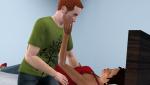
Touching a sim's face.
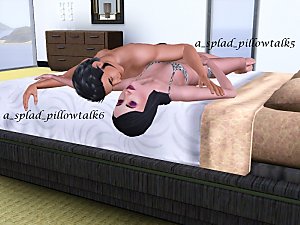
a_splad_pillowtalk11-- female sim; reaching up.
a_splad_pillowtalk12 -- male sim; sitting on the side of the bed.
Kissing a sim's shoulder.
a_splad_pillowtalk13-- female sim; sleeping, curled up. (This pose can be used by itself.)
a_splad_pillowtalk14 -- male sim; kissing shoulder.
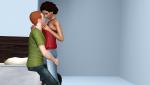
Seduction.
a_splad_pillowtalk15 -- male sim; sitting on the side of the bed, holding sim.
a_splad_pillowtalk16 -- female sim; standing with arm around sim's neck.
A moment of mutual repose.
a_splad_pillowtalk17 -- male sim; sitting on the floor against the side of the bed.
a_splad_pillowtalk18 -- female sim; leaning off the bed, arm around sim's neck.
Kiss me.
a_splad_pillowtalk19 -- male sim; kissing.
a_splad_pillowtalk20 -- female sim; kissing.
As always, you will need to use "moveobjects on" to place your sims in position and they will mush up together when you are done. This is okay! Direct them to walk away from each other and all will be well.
Additional Credits:
Cmomoney for the incredible Pose Player
OrangeMittens for the excellent "Creating Your Own Custom Poses" tutorial
WesHowe for the AnimTool
Mesher for the AF/AM rigs
Inge Jones for S3PE Everyone on Tumblr who took time to look, like, reblog and send messages of encouragement. Thank you! <3
|
Next to You.rar
Download
Uploaded: 30th Oct 2015, 886.2 KB.
18,628 downloads.
|
||||||||
| For a detailed look at individual files, see the Information tab. | ||||||||
Install Instructions
1. Click the download button, or the filename, to download the file to your computer.
2. Extract the zip, rar, or 7z file. Now you will have either a .package or a .sims3pack file.
For Package files:
1. Cut and paste the file into your Documents\Electronic Arts\The Sims 3\Mods\Packages folder. If you do not already have this folder, you should read the full guide to Package files first: Sims 3:Installing Package Fileswiki, so you can make sure your game is fully patched and you have the correct Resource.cfg file.
2. Run the game, and find your content where the creator said it would be (build mode, buy mode, Create-a-Sim, etc.).
For Sims3Pack files:
1. Cut and paste it into your Documents\Electronic Arts\The Sims 3\Downloads folder. If you do not have this folder yet, it is recommended that you open the game and then close it again so that this folder will be automatically created. Then you can place the .sims3pack into your Downloads folder.
2. Load the game's Launcher, and click on the Downloads tab. Find the item in the list and tick the box beside it. Then press the Install button below the list.
3. Wait for the installer to load, and it will install the content to the game. You will get a message letting you know when it's done.
4. Run the game, and find your content where the creator said it would be (build mode, buy mode, Create-a-Sim, etc.).
Extracting from RAR, ZIP, or 7z: You will need a special program for this. For Windows, we recommend 7-Zip and for Mac OSX, we recommend Keka. Both are free and safe to use.
Need more help?
If you need more info, see:
- For package files: Sims 3:Installing Package Fileswiki
- For Sims3pack files: Game Help:Installing TS3 Packswiki
Loading comments, please wait...


Uploaded: 30th Oct 2015 at 1:29 AM
#pose, #poses, #couple poses, #couple's poses, #couples' poses, #kiss poses, #hug poses, #sweet poses, #romantic poses, #cuddly poses
-
-
by spladoum 30th Oct 2011 at 8:32am
 48
88.9k
180
48
88.9k
180
-
by equiem 8th May 2014 at 11:04pm
12
31.3k
73
-
Ride Along--12 poses for motorcycles, scooters, and bicycles
by spladoum 14th May 2014 at 4:15am
+3 packs
13 28k 39 World Adventures
 Ambitions
 Fast Lane Stuff
-

by spladoum 27th Mar 2015 at 3:08am
31
86.7k
254
-
-
-
-
by spladoum 4th May 2018 at 3:52am
4
26.9k
25
-
by k2m1too updated 10th Jan 2021 at 9:31pm
3
6k
18


-
Smoochies! -- A Couple's Pose Set
by spladoum 4th Feb 2012 at 3:23pm
This kiss, this kiss ... more...
30
178.5k
336
-


-
-
-

Hello Sweetie--Fairy Hair Deflowered, for toddlers through elders
by spladoum 29th Sep 2013 at 4:11pm
A classic. Without all those twigs and weeds stuck in it. more...
18
20.9k
74
Hair » Female » Young Adult
-

Pole Position -- A Pole Dancing Pose Set
by Puss 'N Heels 10th Aug 2012 at 9:54pm
Shake your moneymaker ... more...
101
303.4k
437
-
Movie Night -- A couple's pose set
by spladoum 5th Apr 2014 at 9:06pm
For those nights you just need to stay in and relax. more...
17
55.7k
142
-


-
Toddler Dress Up -- Two Generations Outfit Conversions! Base Game Compatible!
by spladoum 18th Aug 2014 at 12:39pm
Outfits for your little ones to play dress up :) more...
8
26.2k
85
-