
 Sign in to Mod The Sims
 "Ye Olde Window" aka Colonial Windows II
 "Ye Olde Window" aka Colonial Windows II


colonial01.jpg - width=800 height=423
colonial02.jpg - width=800 height=705
clolonial-issue.jpg - width=512 height=372

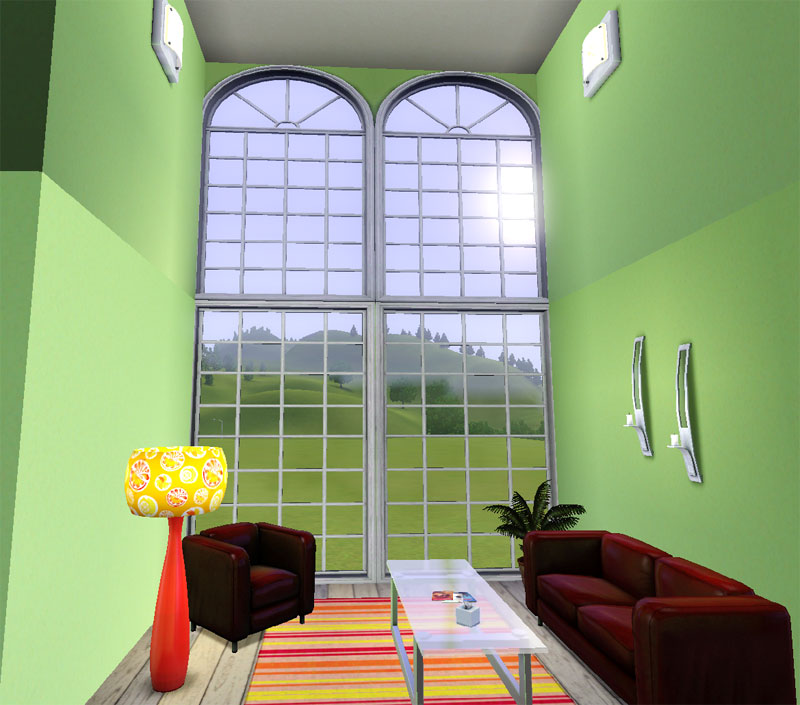
Windows included:
- Ye Olde Window Dormer
- Ye Olde Window Tall Arch
- Ye Olde Window Square
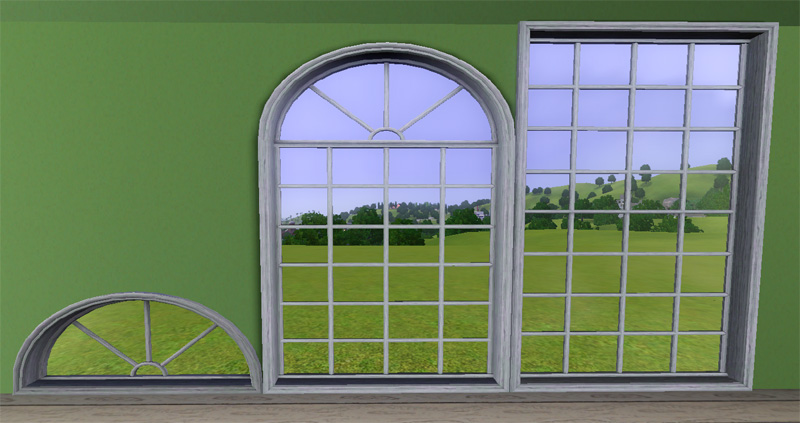
All three are 2-tile windows found in Build / Windows for a cost of $265. Maybe the little dormer could cost less, but I bought one of those in RL and it cost more than a square one!
Known Issue: This is not an issue with these windows per say, but with the way the game cuts out for the window. I have attached an image of it and as you can see it only happens at a specific angle. What happens is the game cuts out for the window the full wall part, but it is only seen if the mesh goes all the way into the corner like these do and if the inside/outside mesh sizes are different thicknesses. The only way to avoid this is to make the mesh smaller width wise or have inside/outside the same thickness. But then the windows wouldn't appear connected when placed side-by-side.
Polygon Counts:
Tall Arch - 512
Square - 608
Dormer - 340
This is a new mesh, and means that it's a brand new self contained object that usually does not require a specific Pack (although this is possible depending on the type). It may have Recolours hosted on MTS - check below for more information.
|
HL_Colonial2x1ArchesFull.rar
Download
Uploaded: 23rd Sep 2009, 1.40 MB.
71,315 downloads.
|
||||||||
| For a detailed look at individual files, see the Information tab. | ||||||||
Install Instructions
1. Click the download button, or the filename, to download the file to your computer.
2. Extract the zip, rar, or 7z file. Now you will have either a .package or a .sims3pack file.
For Package files:
1. Cut and paste the file into your Documents\Electronic Arts\The Sims 3\Mods\Packages folder. If you do not already have this folder, you should read the full guide to Package files first: Sims 3:Installing Package Fileswiki, so you can make sure your game is fully patched and you have the correct Resource.cfg file.
2. Run the game, and find your content where the creator said it would be (build mode, buy mode, Create-a-Sim, etc.).
For Sims3Pack files:
1. Cut and paste it into your Documents\Electronic Arts\The Sims 3\Downloads folder. If you do not have this folder yet, it is recommended that you open the game and then close it again so that this folder will be automatically created. Then you can place the .sims3pack into your Downloads folder.
2. Load the game's Launcher, and click on the Downloads tab. Find the item in the list and tick the box beside it. Then press the Install button below the list.
3. Wait for the installer to load, and it will install the content to the game. You will get a message letting you know when it's done.
4. Run the game, and find your content where the creator said it would be (build mode, buy mode, Create-a-Sim, etc.).
Extracting from RAR, ZIP, or 7z: You will need a special program for this. For Windows, we recommend 7-Zip and for Mac OSX, we recommend Keka. Both are free and safe to use.
Need more help?
If you need more info, see:
- For package files: Sims 3:Installing Package Fileswiki
- For Sims3pack files: Game Help:Installing TS3 Packswiki
Loading comments, please wait...


Uploaded: 23rd Sep 2009 at 6:18 PM
Updated: 25th Dec 2010 at 5:27 PM
#colonial, #ts3, #windows, #maxis match
-
-
by hudy777DeSign updated 28th Oct 2010 at 11:13pm
 172
407.7k
709
172
407.7k
709
-
by HugeLunatic 15th Jun 2010 at 6:20pm
60
99.6k
254
-
by Lisen801 18th Jul 2010 at 10:53pm
27
45.6k
96
-
by AdonisPluto 24th Aug 2010 at 12:18am
10
29.8k
48
-
by Lisen801 10th Oct 2010 at 4:01pm
34
76.5k
208
-
2 new windows for *Extended* walls
by Lisen801 updated 27th May 2012 at 12:44pm
+1 packs
19 59.7k 104 Late Night
-
-
Medieval Centred Leadlight Door - Ye Olde Kingdom of Pudding
by The Merrye Makers 28th Jan 2012 at 9:31pm
13
44.8k
119
-



-
by HugeLunatic 14th Feb 2010 at 1:16am
I love the new crib that plasticbox made, the Little Sister crib because I love simple furniture and more...
94
162k
401
-
[Recolorable] - Maxis Modular Stairs - III
by HugeLunatic updated 31st Jan 2018 at 1:11pm
I guess the last one wasn't one last set. more...
 12
54.5k
115
12
54.5k
115
-


by HugeLunatic 30th Sep 2014 at 3:57am
rawr! Animal prints for your adult males. more...
-


by HugeLunatic 6th Nov 2012 at 9:07pm
TSS had these cute butterfly walls in it, and I thought it would be the perfect wall for the child more...
9
12.9k
21
-
by HugeLunatic 19th Sep 2009 at 8:29pm
**Updated 27-Oct-09** Fixed Club desk in the HL_base_1TileDesks.rar. more...
174
362.5k
1.1k
By Function » Surfaces » Desks
-
OFB International Window Extras - Part II - Arches
by HugeLunatic 31st Jul 2009 at 10:50pm
Part II of my OFB International Windows and Doors add on set. more...
+1 packs
8 38.9k 69 Open for Business
-
Driveway - Sidewalk Match [Recolor]
by HugeLunatic 25th May 2013 at 4:54am
Driveway recolor to match default sidewalks. more...
+1 packs
27 37.6k 140 Nightlife
-
Late Night - Buyable Mailbox and Trash Chute
by HugeLunatic 3rd Nov 2010 at 7:05pm
This requires Late Night! more...
+1 packs
97 172.7k 275 Late Night
-
by HugeLunatic 29th Aug 2011 at 8:12am
Cottage apartments originally was a two story affair with a garage tucked under, but when the budget went over the more...
9
33.2k
63
-

by HugeLunatic 31st May 2015 at 10:00pm
Five recolors of the Obstacle Course Career Reward. more...
8
8.1k
8


About Me
Pet Stories || Dog Agility Items? || Castaway Stories || Holy Simoly Extras
4esf Archive || Holy Simoly Archive || CEP-Extras List || Buyable Game Objects
lunie content from GoS/s2a
 Installation of CEP Extras
-the package with pfiles appended to the name will go into your cep extras folder where your game is installed (typically c drive, you do you)
-the other goes in CEP extra folder in documents.
The following locations are what I am aware of, beyond that you'll have to do some searching.
Downloads Folder:
C:\Users\<user>\Documents\EA Games\The Sims 2 Legacy
C:\Users\<user>\Documents\EA Games\The Sims 2 Ultimate Collection
With multiple launchers, the location for your game install will vary.
C:\Program Files\EA GAMES\The Sims 2 Legacy\TSData\Res\Catalog\zCEP-EXTRA
C:\Program Files\EA GAMES\The Sims 2\TSData\Res\Catalog\zCEP-EXTRA
C:\Program Files (x86)\EA GAMES\The Sims 2\TSData\Res\Catalog\zCEP-EXTRA